
Your F95zone games, kept in order.
続き · tsuzuki · “the next part”
Tsuzuki follows the games you play, tells you when the next part is out, launches them, and carries your saves into every new version. A 4 MB app for Windows: your library never leaves your PC.
- No account, no server in between
- No F95zone login
- Imports F95Checker, or a whole games folder
- Signed updates, installed when you say
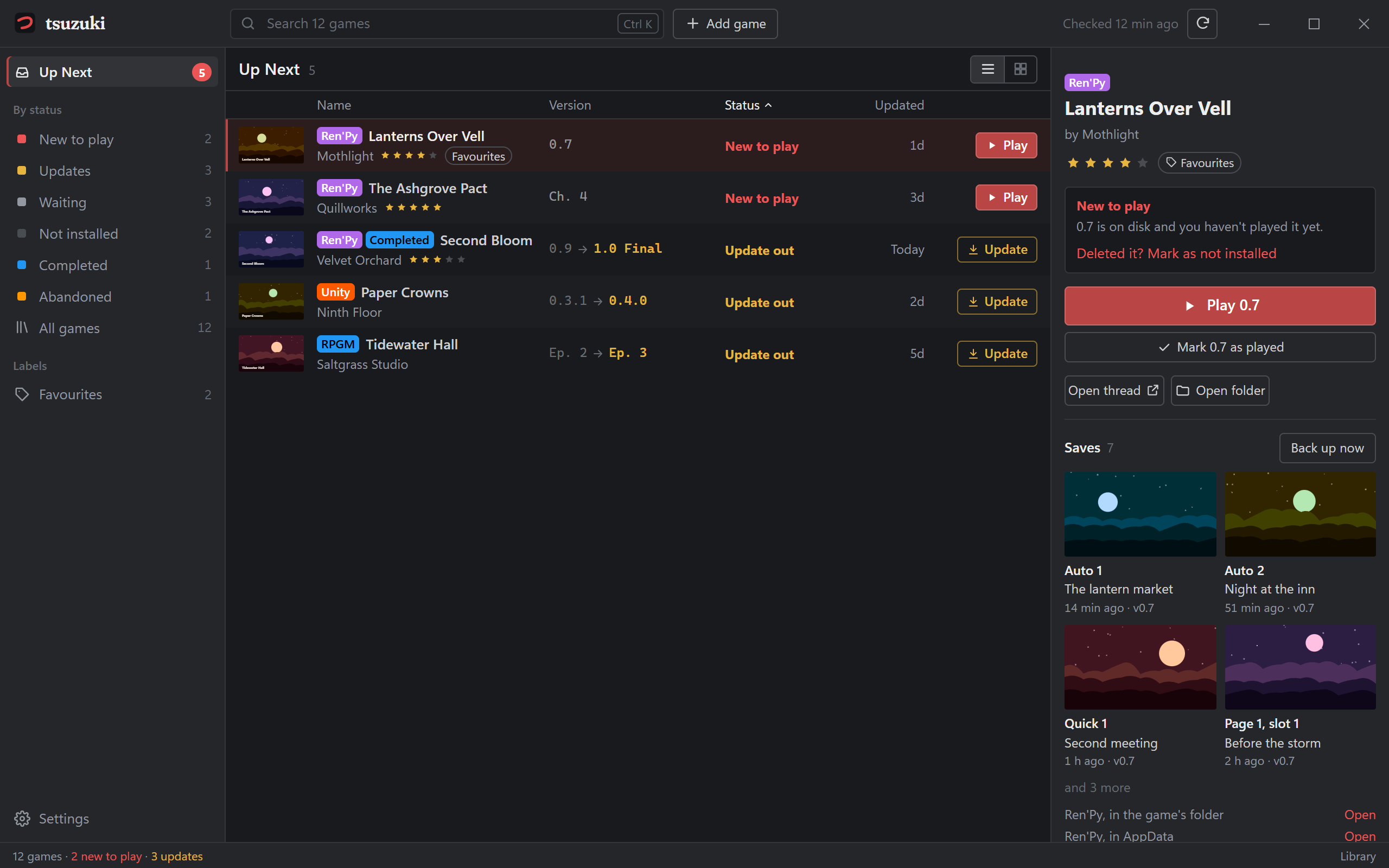
Up Next: what's new to play, what has an update, and the selected game's saves. (Made-up games, for the picture.)
Why Tsuzuki
There are bigger library managers, with download managers, catalogs and a dozen sites. Tsuzuki is the small one: it follows your F95zone games, looks after your saves, and stays out of the way.
-
4 MB
Small and quick
Starts at once, idles in the tray, and checks F95zone every few hours. A notification says when a game updates.
-
0 servers
Nothing in between
Tsuzuki asks F95zone itself. Your list of games goes to no one else: no Tsuzuki server, no account, no tracking.
-
No login
Your password stays yours
Version checks use F95zone's public data. Downloads open in your own browser, where you're already signed in.
-
1 step
From F95Checker
Games, installs, ratings, labels, notes, folders and covers come across. F95Checker's files are left as they are.
What it does
Add a game by pasting its thread link, searching by name, from F95zone with the browser extension, or a whole folder of them at once. From there:
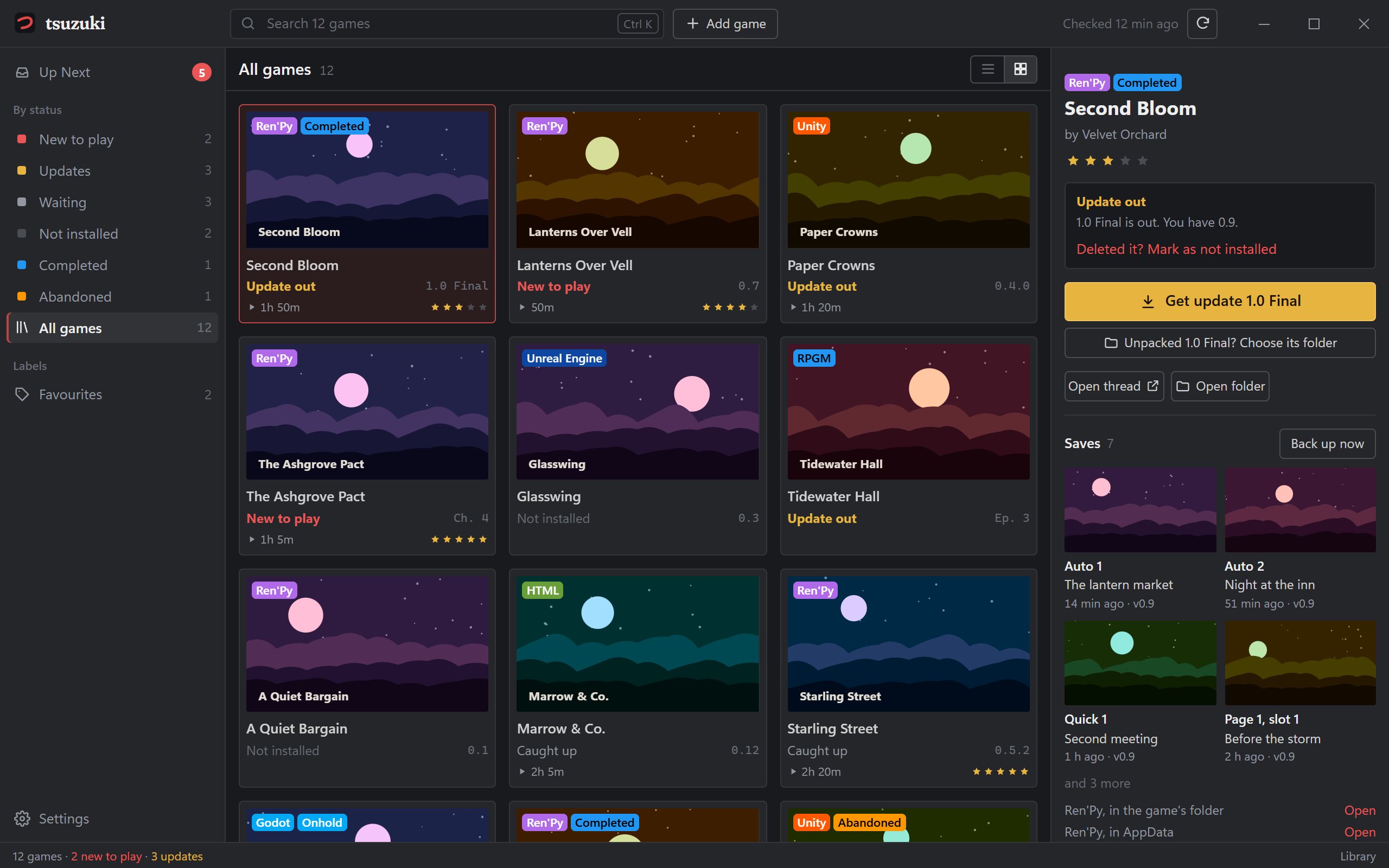
Every game, and where you stand
Each game says what's waiting for you: new to play, update out, waiting for the next part, or caught up. Up Next gathers the ones that need you.
- Checks at start and every six hours, from the tray.
- One notification however many games updated.
- Ratings, labels and notes of your own; right-click any game for quick actions.
Bring the games you already have
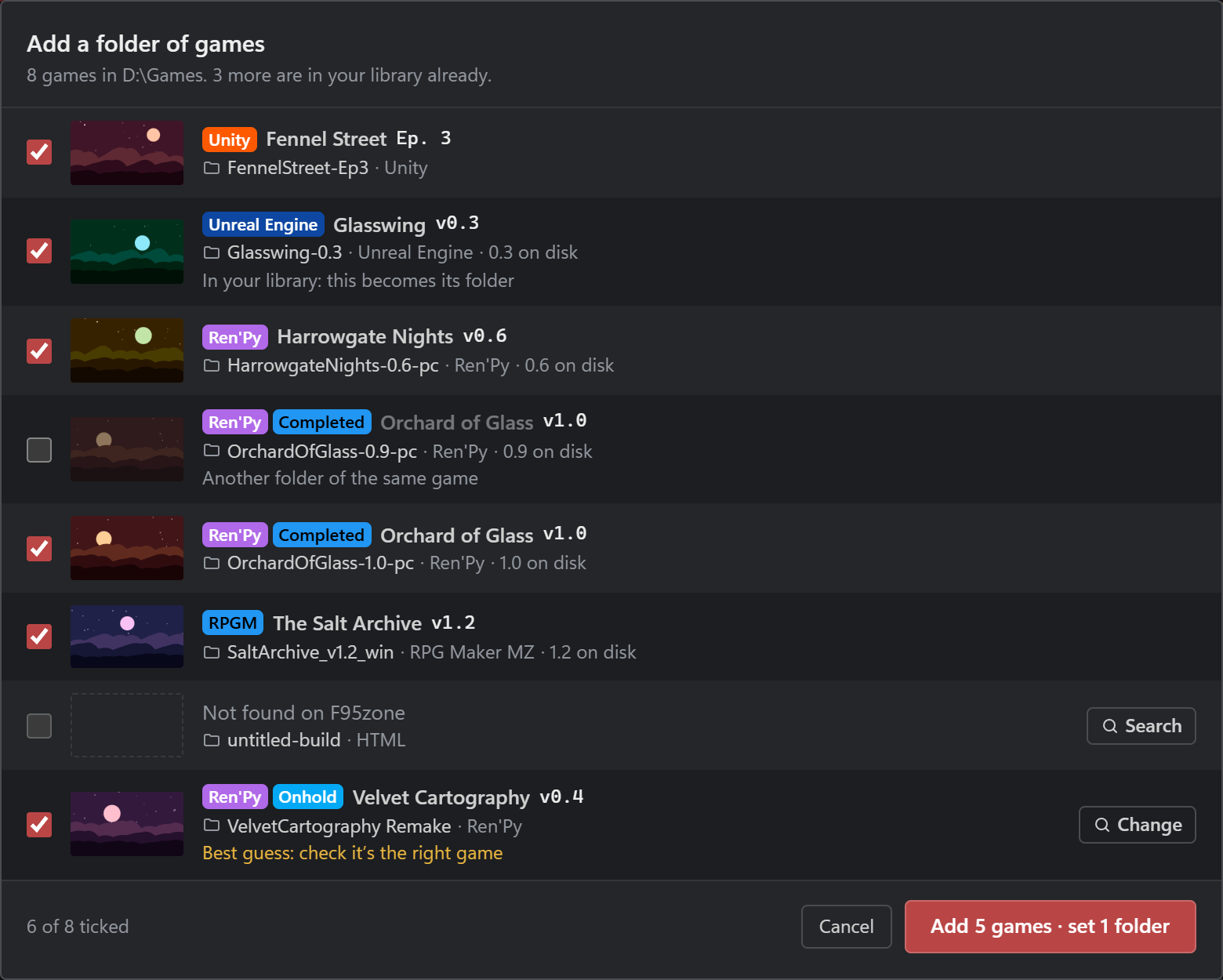
Point Tsuzuki at the folder your games are in, or drop it on the window. It finds every game, folders of folders too, looks each one up on F95zone, and shows you what it found before adding anything.
- Two versions side by side? It picks the newer one.
- Unsure of a match, it says so, and you can search for the right game.
- Folders are set as games are added, so Play works straight away.
Saves that come with you
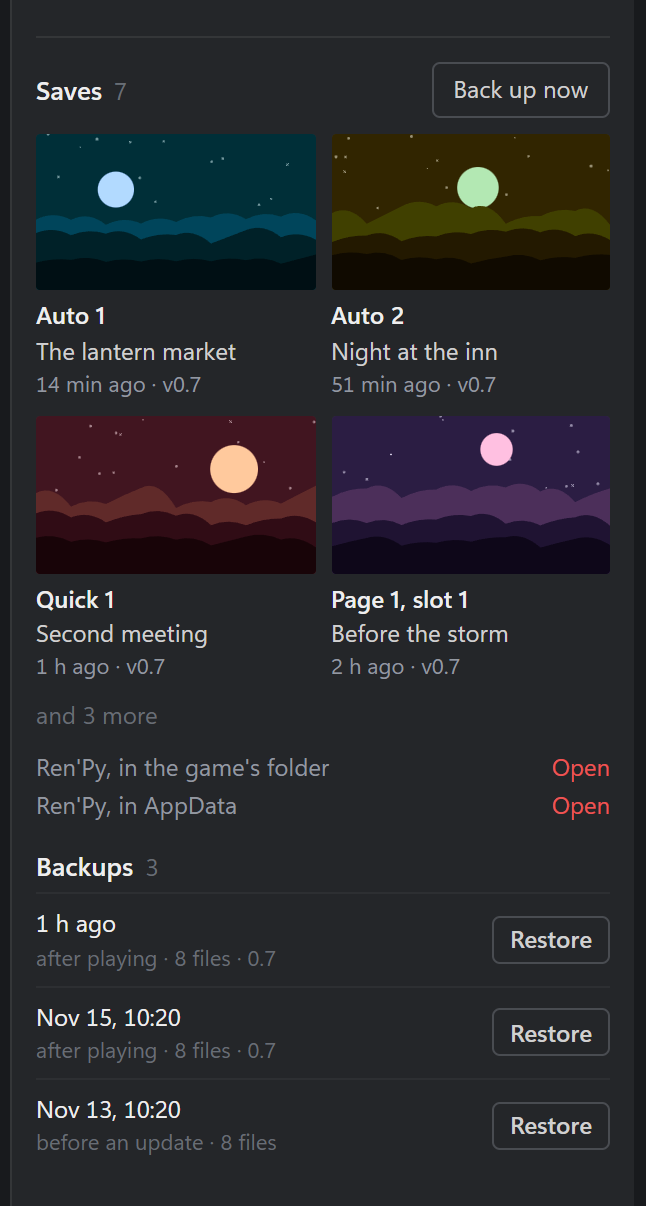
Tsuzuki backs up a game's saves after every session, wherever its engine keeps them: Ren'Py, RPG Maker, Unity, Wolf RPG and more.
- Unpacked a new version? Choose its folder, and your saves come across. Nothing already there is replaced.
- Then the old version's folder can go to the Recycle Bin in one click.
- Any backup goes back in one click; what's there first is backed up too.
- Save screenshots and names, right beside the game.
- Lanterns-0.6-pc
- Lanterns-0.7-pc
Add games from F95zone itself
The browser extension marks every game in your library with Tsuzuki's seal, wherever F95zone links to it. Its colour says where you stand.
- Add to Tsuzuki under a game thread's title, or right-click any thread link.
- Click a seal to open that game in Tsuzuki.
- It talks only to Tsuzuki on your PC. Comes with the app, for Chrome, Edge, Brave and Opera.
Launches the game for you
Show it a game's folder once. It recognises Ren'Py, RPG Maker, Unity, Unreal, Godot, Wolf RPG and HTML games, starts the right file, and counts your play time. The tray's Play menu starts your recent games without opening the window.
Updates itself, safely
New versions of Tsuzuki download in the background and install when you choose Restart to update. Each is signed, and Tsuzuki won't install one that doesn't match. You can turn this off.
Changelog
Tsuzuki 1.0.0 the newest
The first public release, 16 November 2026.
- Your F95zone games in one library: add them by thread link (paste several at once), by name, or from F95zone with the browser extension, and see at a glance what's new to play, what has an update out, and what's waiting for its next part. Right-click any game for quick actions, rating included; a wide window shows your rating and play time in the list.
- Add a folder of games: point Tsuzuki at the folder your games are in (or drop it on the window). It finds each game, folders of folders too, looks it up on F95zone, and adds the ones you tick with their folders set, so Play works at once.
- Checks F95zone at start and every six hours, from the tray, and tells you when a game updates. No account and no F95zone login: Tsuzuki talks only to F95zone's public game data and to its own site.
- Launches games and counts your play time. The tray's Play menu starts your recent games without opening the window.
- Save Vault: saves are backed up after every session. Unpack a game's new version, choose its folder, and your saves come across; nothing already there is replaced. Then the old version's folder can go to the Recycle Bin in one click.
- Browser extension for Chrome, Edge, Brave and Opera: games in your library carry Tsuzuki's seal wherever F95zone links to them, and any thread can be added in one click. It comes with the app, in Settings.
- Imports your F95Checker library in one step.
- Updates itself: new versions download in the background, signed and checked, and install when you restart. Settings shows the progress and lets you turn it off.
Questions
Does Tsuzuki download games for me?
No. Downloads stay on F95zone, in your own browser, where you're signed in. Tsuzuki tells you a new version is out and opens its thread.
Once you've unpacked it, choose its folder in Tsuzuki (the button says Unpacked … ? Choose its folder) and your saves come across. Then the old version's folder can go to the Recycle Bin in one click.
I already have a pile of games unpacked. Do I add them one by one?
No. Choose Add game, then Add a folder of games…, and pick the folder they're in. Tsuzuki finds each game, looks it up on F95zone and shows you what it found. Tick the right ones and they're added with their folders set, ready to play.
Coming from F95Checker? Settings › Import from F95Checker brings everything across instead.
Do I need to sign in to F95zone, or anywhere?
No. Tsuzuki reads F95zone's public game data (titles, versions, covers), the same for everyone, and never asks for your password. There's no Tsuzuki account either.
What does Tsuzuki send over the internet?
Only two kinds of request: F95zone's public game data, to check versions and to look games up when you add them, and this site's latest.json, to see if there's a new Tsuzuki. Only F95zone sees which games you follow (their thread ids, to check them); nothing about you is sent anywhere, and there's no analytics.
The browser extension talks only to Tsuzuki, on your own PC.
Why does Windows warn me about it?
Tsuzuki isn't code-signed: a certificate would put a legal name on it. Click More info, then Run anyway. To be sure the download is the real one, compare its SHA-256 with the one under Installing.
Tsuzuki's own updates are signed with its key and checked before anything is installed.
Can I keep using F95Checker?
Yes. The import only reads F95Checker's library; its files, and its saved login, are left alone. Both can run side by side.
Where is my library kept? How do I move it to a new PC?
In one folder: Settings › Your library › Open folder. It holds your games, play history, covers and save backups. Copy it to the same place on the new PC, before starting Tsuzuki there.
How do I install the browser extension?
It comes with Tsuzuki. In Tsuzuki, open Settings › Browser extension: it shows the folder and the three steps (Developer mode, Load unpacked, pick the folder). It updates when Tsuzuki does.
It works in Chrome, Edge, Brave and Opera. Firefox needs a copy signed by Mozilla, which comes later.
How do I uninstall it?
Quit Tsuzuki from its tray icon, then remove it in Windows Settings › Apps. Your library folder stays, in case you come back; delete it too if you want it gone.
Mac or Linux?
Windows only, for now.
Installing
- Download Tsuzuki_1.0.0_x64-setup.exe and run it. It installs for your Windows account only; no administrator rights needed.
- Windows may say it protected your PC. Click More info, then Run anyway (see why).
- To check your download is the real one, compare its SHA-256 with this:
51169641cb535e27ce724d3e10a339f31f016176508449acf035d318b98e30d5